

Blog
How to Accept Payment from MBL Mobile Banking to Meesaa

In today’s digital world, mobile payments are increasingly becoming a standard method for businesses to process transactions. MBL Mobile Banking helps to simplify these processes ensuring seamless and easy transections. At Meesaa, we understand the importance of smooth and easy transactions for our customers. That’s why we have integrated MBL Mobile Banking into our payment system, making it simple for you to pay for your affordable jewellery pieces. This article will guide you step by step on how to make payments through MBL Mobile Banking when shopping at Meesaa.
What is MBL Mobile Banking?
MBL Mobile Banking, also known as Mobile Banking Lite, is a digital platform that simplifies banking tasks for users directly from their smartphones. It enables individuals and businesses to perform various banking activities such as transferring funds, paying bills, and accepting payments. For customers shopping at Meesaa, MBL offers a quick and secure way to make payments for jewelry purchases, through the Fonepay Payment Service provided by MBL.
Key Features of MBL Payments To Meesaa
- Instant Transactions: Payments are processed quickly, ensuring real-time transfers.
- User-friendly Interface: The mobile app is designed to be easy to navigate, even for first-time users.
- Security: MBL incorporates advanced security measures to protect your financial data.
How MBL Mobile Banking Works To Send Payments
MBL Mobile Banking connects to your bank account, allowing you to access funds and complete transactions directly through the app. To make a payment for your jewelry, follow these simple steps:
Steps Involved in Mobile Banking Transactions
- Initiate Payment: Once you select the jewellery you wish to buy, choose MBL Fonepay as your payment option during the checkout.
- Enter Payment Details: Enter the required amount or scan the dynamic QR Code and authorize the transaction via the MBL app.
- Receive Payment Confirmation: You will receive an instant confirmation of your payment, and your order will be processed and successfully delivered.
Prerequisites for Accepting Payments via MBL
Before you can use MBL to make payments at Meesaa, you need to ensure that you meet the following requirements:
- Mobile Banking: You must have an MBL account linked to make payments.
- Meesaa Account: You must have an account created on Meesaa for the transection and security purpose.
- Internet Access: An active internet connection is necessary to complete payments.
Setting Up MBL Payment Gateway on Meesaa
At Meesaa, we’ve made it easy for you to use MBL Mobile Banking for purchases. To get started, follow these steps:
- Visit Meesaa’s Website: Browse through our wide selection of affordable jewellery (meesaa.com/shop).
- Select MBL Fonepay as Your Payment Method: During checkout, choose MBL Mobile Banking Fonepay as your preferred payment option.
- Complete the Payment: Follow the instructions provided and complete the payment.
- Payment Confirmation: Once your payment is successful, you’ll receive a confirmation notification, and your order will be processed.
How to Accept Payments from MBL on Meesaa
Accepting payments for your jewelry orders on Meesaa is easy when using MBL Mobile Banking. Follow these steps:
- Choose the Payment Method: Select MBL Mobile Banking Fonepay during checkout.
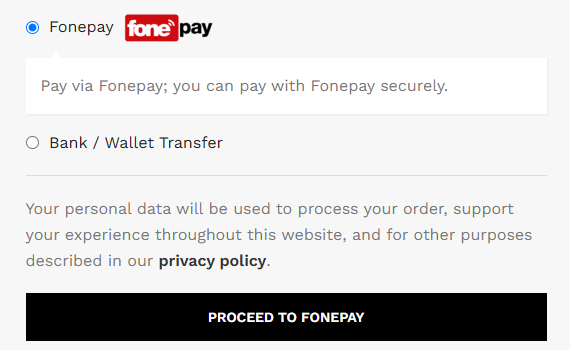
- Share Payment Details: Display your QR code for in-person payments or share the payment link for online transactions.
- Confirm Payment: Once the payment is made through MBL Fonepay, you will receive a confirmation notification, and your jewelry order will be processed immediately.
- Track Payments: You can track the payment status in your MBL Mobile Banking or any banking app for real-time updates.
Different Payment Methods on MBL Mobile Banking
At Meesaa, we provide several ways for you to make payments via MBL Mobile Banking:
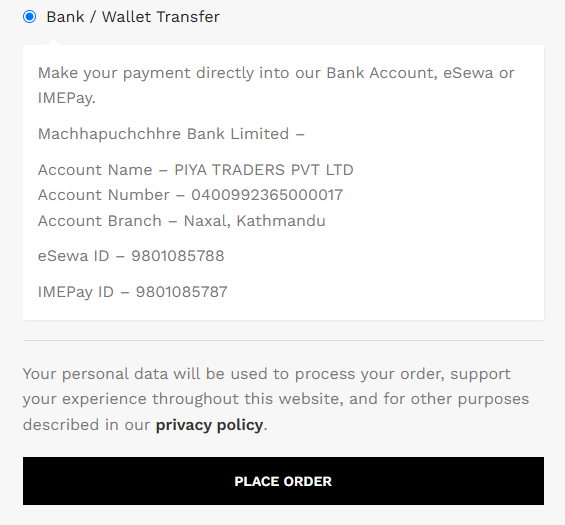
- Bank Transfers: You can transfer funds directly from your MBL account to complete your payment.
- Mobile Wallets: Accept payments from mobile wallets linked to MBL.
- QR Codes: We also have dynamic QR Code so you can easily pay.
Managing MBL Payments
Once you start accepting payments through MBL, managing them is easy. The MBL app provides tools to:
- Track Payments: View transaction history and check payment status.
- Withdraw Funds: Transfer funds from your MBL account to your linked bank account.
- Set Notifications: Get notified in real time when a payment is received.
Benefits of Accepting Payments via MBL
Convenience for Businesses and Customers
- Fast Transactions: Payments are processed in real time, improving cash flow.
- Ease of Use: Both businesses and customers find mobile payments simple to use.
Improved Cash Flow
By accepting payments via MBL, businesses can receive funds immediately, enhancing their liquidity and financial management.
Common Issues and Solutions
While MBL is generally reliable, you might encounter some issues. Common problems include:
- Transaction Failures: Ensure that both the customer and you have stable internet connections.
- Payment Delays: Occasionally, there may be delays due to server maintenance; contact MBL support for assistance.
Security Measures in MBL Mobile Banking
MBL incorporates state-of-the-art encryption methods (28-bit SSL encryption) to ensure the security of all transactions. This includes:
- Two-Factor Authentication: For added security, users must verify their identity before making transactions.
- Fraud Detection: MBL uses advanced algorithms to detect suspicious activities and prevent fraud.
Using MBL for International Payments
MBL Mobile Banking also supports international payments through cybersource, which allows businesses to accept payments from customers abroad. The platform offers competitive exchange rates and minimal fees for cross-border transactions.
Mobile Banking Fees and Charges
While MBL is a cost-effective payment method, it’s important to be aware of the fees involved. Charges may include transaction fees, monthly maintenance fees, and international transaction fees.
Customer Support for MBL Payment Issues
If you encounter any issues with MBL payments, you can easily reach out to their customer support team. The team is available via phone, email, or chat for prompt assistance.
Conclusion
MBL mobile banking provides an easy, secure, and efficient way for businesses to accept payments from customers. With its quick setup, multiple payment methods, and robust security features, MBL is an excellent choice for modern businesses. Whether you’re a small startup or a large enterprise, mobile payments via MBL can help streamline your financial operations.
FAQs
Payments are processed instantly, so you’ll receive a quick confirmation.
Yes, MBL supports international payments with competitive exchange rates and minimal fees.
Ensure your internet connection is stable and try again. If the issue persists, contact MBL support.
No, there is no any additional fee during MBL Fonepay payment.
Yes, MBL uses advanced encryption (28-bit SSL encryption), and fraud detection measures to ensure secure transactions and pay for your favorite jewellery or items instantly.
Yes, MBL Mobile Banking offers limited offline functionality for basic transactions.
Immediately lock your card using the ‘Lock Card’ feature in the app or contact MBL support or visit the nearest branch as soon as possible with your original citizenship ID.
Yes, as of now MBL Debit Card works on India and Bhutan only.
Meesaa – “Feel Special”
Download our App On Play Store as well as On App Store and Save More On App!!